
UAE e-invoicing integration is straightforward when every invoice comes from one ERP. It gets harder when invoices come from an ERP, a CRM, retail tills and an online store at the same time, which is the normal setup for a business with AED 50 million or more in revenue. Your Accredited Service Provider (ASP) will exchange the e-invoices and report to the FTA. It will not fix the data you send it. This guide explains what your systems need to provide, where multi-system data usually goes wrong, and four ways to connect everything.
Last updated 22 October 2026. Always check field-level rules against your ASP's PINT AE data dictionary.
What your ASP expects from your systems
The Ministry of Finance's Electronic Invoicing Guidelines split readiness into steps. Two of them concern your systems directly: agree an approach to transmit invoice data, and make sure your systems are ready to transmit it. Three facts shape everything that follows:
- E-invoices are XML files built to the Peppol PINT AE specification. They have no QR code or barcode.
- You appoint one ASP for both sending and receiving.
- E-invoicing does not remove the duty to issue a tax invoice. It changes the form the tax invoice takes.
So the job of your own systems is to produce complete, correct invoice data for each transaction. The ASP validates it, converts or carries it as PINT AE, exchanges it and reports it. If the data is wrong when it arrives, the invoice is rejected, and a rejected invoice is an invoice that has not been issued.
Why UAE e-invoicing integration is harder with several systems
Each system was built for a different job, so each one is strong in one area and weak in another. The table below is a general picture, not a verdict on any product.
| System | Usually strong at | Common e-invoicing gap |
|---|---|---|
| ERP | Ledger, tax codes, credit notes | Custom invoice types, or no export in the structure your ASP expects |
| CRM | Customer records, deals, quotes | Missing TRNs and tax codes; invoices raised outside the ERP |
| Point of sale | Speed and volume | Numbering per outlet; business and consumer sales mixed together |
| Online store | Order data, payment status | Receipts produced as PDFs; business buyers' TRNs not collected |
| Custom or legacy billing | Whatever your developer built | No link from credit notes to original invoices; no documentation |
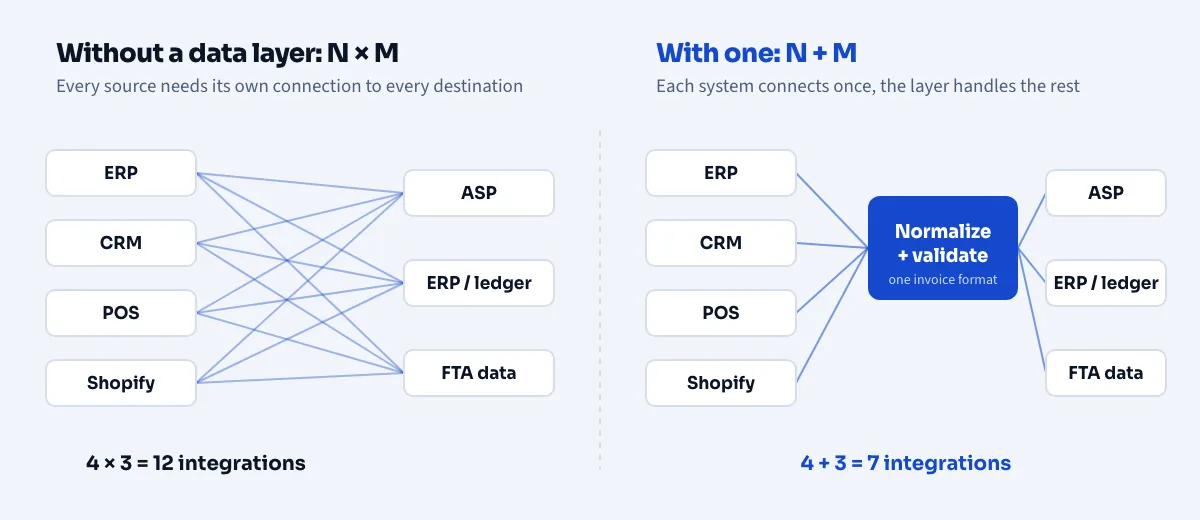
Connecting each of these directly to an ASP means building and maintaining a separate integration per system. That is the N x M problem: with four sources and three destinations (the ASP, your ledger and your reporting) you can end up with twelve connections to build and test. A shared data layer reduces that to N + M, here seven.
Where multi-system invoice data goes wrong
These are the checks that catch most problems before an ASP rejects anything. Use your ASP's PINT AE data dictionary as the final word on which fields are mandatory for each invoice scenario.
| Data point | What to check across every system |
|---|---|
| Seller identity | Correct TRN and legal name for each entity, including branches and VAT group members |
| Buyer identity | Name, address and TRN for business customers, and a clear flag that separates businesses from consumers |
| Invoice number | Unique per issuer across all systems. Two systems that both issue "INV-1001" will collide |
| Dates | Issue date, and the supply date where it differs |
| Currency | Invoice currency and any conversion to AED |
| Tax | Tax category and rate on every line: standard-rated, zero-rated, exempt or out of scope, with consistent rounding |
| Lines | Quantity, unit, unit price, discounts and product codes that mean the same thing in every system |
| Credit notes | A reference back to the original invoice |
| Transaction flags | Indicators such as free-zone transactions, where they apply to the sale |
One point deserves its own warning. Consumer (B2C) sales are outside the e-invoicing scope, but business sales are inside it. If the same till or web shop handles both, your integration must decide, for every sale, whether an e-invoice is needed. That decision needs a reliable buyer type and a TRN where the buyer is a business.
Four approaches to UAE e-invoicing integration across several systems
| Approach | Works well when | Watch out for |
|---|---|---|
| 1. Your ERP's built-in or add-on module | Almost all invoices already come from one ERP | Everything outside the ERP still needs its own route |
| 2. One ASP connector per system | Your ASP already supports each of your systems | Uneven coverage; each connector has its own mapping and limits |
| 3. Custom API or file export per system | You have in-house developers and few systems | Maintenance grows with every system, and each export needs its own validation |
| 4. A shared data layer in front of the ASP | Invoices come from three or more systems, or systems change often | One more component to run, so check its uptime, retry handling and audit trail |
None of these is right for everyone. A business with one ERP and a small web shop may be fine with options 1 and 2. A retail group with an ERP, several POS vendors, a CRM and an online store usually has more to gain from option 4.
A UAE e-invoicing integration rollout plan for several systems
- Start with the highest-volume or highest-risk system. Get one source working end to end before you add the next.
- Use the voluntary phase. Voluntary e-invoicing has been open since 1 July 2026, and penalties apply only from the date you are required to comply.
- Agree one internal invoice structure. Map each system to it once, so adding a system later does not mean redoing the ASP side.
- Run old and new in parallel. Compare what each system issued with what the ASP accepted, and investigate every difference.
- Watch rejections daily. Name a person who owns the rejection queue and a person who owns master-data fixes.
Questions to ask your ASP about integration
- Which source systems do you connect to natively, and which need custom work?
- What formats do you accept from us, and how do you validate before submitting?
- When an invoice is rejected, how fast do we hear, and what does the message tell us?
- Can several systems and several entities send through one account?
- What are the retry, outage and reporting arrangements if your service is down?
Frequently asked questions
Can Shopify or WooCommerce produce a UAE e-invoice by default?
Standard order documents from online stores are usually PDFs or emails, not PINT AE XML. Connectors from third-party vendors exist, but check each one with your ASP and your platform vendor before you rely on it.
Do POS sales to walk-in customers need e-invoices?
No, sales to consumers are out of scope for now. Any sale to a business through the same POS is in scope and needs an e-invoice.
Do I need a separate ASP for each system?
No. A business in scope appoints one ASP for sending and receiving. Your systems all feed that one ASP.
Is a PDF invoice enough if it looks right?
No. The mandated format is structured XML following PINT AE.
Where Invoiauto fits
For UAE e-invoicing integration across several systems, Invoiauto is a data layer that sits between your systems and whichever ASP you choose. It connects each source once, normalizes the fields into one structure, validates the data before it leaves, delivers it to your ASP, and keeps a status trail for every invoice. It does not replace your ASP or your ERP. If you want to see how it would map your systems, request early access. For the wider Phase 1 plan, read our UAE e-invoicing Phase 1 checklist.